
In this guide
- First, know what you are building
- See the difference with one ordinary task
- Build your first useful system in seven steps
- Give each agent a job contract
- Let a CEO agent coordinate specialists while a human governs
- What my own setup has taught me
- Build a command center that tells the truth
- A practical first month
- Common mistakes that make an ecosystem look busy without creating value
- Sources and editorial method
An AI assistant can write a polished answer in seconds. A useful agent system does something harder: it takes a real task, uses the right information, stays within its authority, produces work you can inspect, and shows whether the result helped. Here is a practical path from one prompt to a supervised team of specialists, with a command center that makes the work visible.
I have spent time building an agent operating model around those questions. The lesson I would give someone starting today is simple: begin with a valuable task, not a cast of AI characters. You can get substantial value from one good prompt or one reliable workflow. Add autonomy, specialists, and a dashboard only when each addition solves a problem you can name.
First, know what you are building
People use model, prompt, workflow, and agent as if they mean the same thing. They do not. These working definitions are enough to start:
| Component | Plain meaning | Example |
|---|---|---|
| AI model | The underlying system that interprets input and generates output. | The model that reads meeting notes and drafts a summary. |
| Prompt | The instructions and context you give the model for a task. | "List decisions, owners, and unanswered questions from these notes." |
| Workflow | A defined sequence of steps, with people or software deciding what happens next. | Each Friday, collect notes, extract actions, review them, then update a task list. |
| Agent | A configured system that can pursue a bounded objective across steps, choose or call permitted tools, and use the results before it stops. | Read approved notes and a task list, identify missing owners, propose updates, then request review. |
| Agent ecosystem | Multiple accountable roles, tools, handoffs, shared records, controls, and ways to measure results. | An intake coordinator routes work to narrow specialists and returns a verified decision packet. |
| Command center | The view that shows a human what needs attention, what is happening, and what evidence supports completion. | A dashboard with pending approvals, owners, deadlines, source freshness, and receipts. |
These are practical distinctions, not universal industry labels. Anthropic draws a narrower technical line: a workflow follows predefined code paths, while an agent lets the model direct more of its own process and tool use. OpenAI describes an agent as a configured model with instructions and optional tools, guardrails, handoffs, and structured outputs. Both descriptions point to the same useful question for a beginner: who chooses the next step, and how is that choice checked? Anthropic on effective agents, OpenAI on agent definitions.
You do not need to train your own foundation model to create an agent. Most people should start by configuring an existing model and a small set of tools. A name, persona, or long instruction document alone does not prove that an agent can do a job. The proof is in its permitted actions and the quality of the resulting work. OpenAI on tools, OpenAI on running agents.
See the difference with one ordinary task
Suppose your team finishes a weekly project meeting. You need a dependable list of decisions, owners, deadlines, and open questions.
A basic prompt: "Summarize this meeting." It may produce a readable paragraph. It may also miss an owner or quietly guess a due date.
A better prompt: "Using only these notes, list confirmed decisions, action items with named owners and dates, and unresolved questions. Write 'owner unknown' or 'date unknown' when the notes do not say. Quote the note that supports each action. Do not update any system." This is still one prompt, but it has a clear output and a rule against invented facts. Clear instructions, context, and examples are core prompting tools. OpenAI's prompt engineering guide.
A workflow: After every meeting, someone provides the notes, the AI drafts the list, a person checks it, and only then is the task board updated. The sequence is repeatable even if no AI acts independently.
An agent: With permission, it can read the notes and the current task board, compare them, flag duplicates and missing owners, draft proposed changes, and stop for a human decision. It should retain the source excerpt for every proposed task. Tool access makes the work more capable, and it makes boundaries more important. OpenAI on tools, OpenAI on human review.
If the better prompt already solves the problem reliably, stop there. Complexity costs time, money, and attention. Anthropic recommends starting with the simplest design that meets the need; its guidance notes that agentic systems can trade extra latency and cost for performance. Anthropic's engineering guidance.
Build your first useful system in seven steps
1. Choose one recurring outcome
Pick a task that happens often enough to test, has clear inputs, and produces an output someone already uses. "Make my business more productive" is too broad. "Turn weekly meeting notes into an action list that a manager accepts" is testable. Record the current process first: time spent, common mistakes, rework, and the decision the output supports.
2. Define what counts as done
Write the acceptance test before the prompt. For meeting actions, a good result might include every explicit decision, no invented owners or dates, a source excerpt for each item, and a reviewable list of uncertainties. Define failure too: a missing action, a duplicate task, or an unsupported claim of completion. The goal is a better operational result, not an impressive demonstration.
3. Identify the source of truth
Choose the notes, task system, or approved document that the system may use. Label anything that is a snapshot, an estimate, or a draft. Set a freshness rule such as "use only notes from this meeting and a task list retrieved today." If an agent cannot reach the source, it should say so and stop or mark the output provisional. A current timestamp on a dashboard does not make old underlying data current.
4. Write and test one prompt
Start with the better prompt above. Run it against several past meetings, including messy notes, conflicting dates, and meetings with no action items. Compare the output with the record and have the person who uses the list judge whether it saves work. Fix the prompt and the inputs before adding more agents. OpenAI recommends evaluation suites as prompts and model versions change. OpenAI on prompt engineering.
5. Add a tool only for a specific job
If manual copying is the bottleneck, grant read access to the approved task board. If proposed updates are valuable, add a tool that creates a draft or pending change. Do not give broad write access simply because it is available. Keep the first useful version read-only or draft-only when practical. Put validation beside any tool that can change something, and pause consequential actions for review. OpenAI on tools, OpenAI on approval controls.
6. Test the full loop, including bad cases
Ask more than "Did it answer?" Check whether it used the right source, chose the right tool, asked for help when information was missing, and stopped at its authority limit. Keep a small set of real, permission-cleared examples and expected outcomes. Inspect actual runs when something goes wrong. OpenAI's agent evaluation guidance recommends traces for understanding tool calls and handoffs, followed by repeatable datasets and evaluation runs. OpenAI on agent evaluations.
7. Measure value after deployment
Track accepted outputs, time saved after review, corrections, rework, missed items, cost, and the time a human spends supervising. A task completed quickly but corrected three times is not an efficiency gain. If the system fails frequently, reduce its scope, improve the source, or return to a simpler workflow.
Give each agent a job contract
Before you build an agent, write one short charter. The following is a starter template. Fill it in with a real task, not a personality:
Job: What specific outcome does this agent own?
Inputs: Which sources may it use, and how fresh must they be?
Tools: What may it read, draft, or change?
Authority: What can it finish alone, and what requires a person?
Method: What checks must it perform before returning work?
Output: What format, source links, and uncertainty labels must it provide?
Stop rule: When must it pause, escalate, or say "unverified"?
Success test: How will a human judge the result?
Owner: Who remains accountable when the agent makes a mistake?
For the meeting example, the agent's authority could be: "Read approved notes and the task board, draft a proposed action list, and flag conflicts. Never assign a person or publish a task without human review." That is more useful than "Act like a world-class executive assistant." A clear job, tool surface, output contract, and review point make behavior easier to inspect and improve. OpenAI on agent definitions, OpenAI on guardrails and review.
Here is a first instruction you can adapt in a tool that accepts custom agent instructions:
You review weekly meeting notes. Use only the notes I provide and, if connected, the approved task board. Return confirmed decisions, proposed actions, named owners, stated dates, open questions, and a source excerpt for each item. Mark missing owners and dates as unknown. Flag duplicates and conflicts. You may read the board and draft proposed changes. Do not assign people, update the board, or send messages without my review. Finish with what you verified, what remains uncertain, and the exact changes awaiting approval.
Let a CEO agent coordinate specialists while a human governs
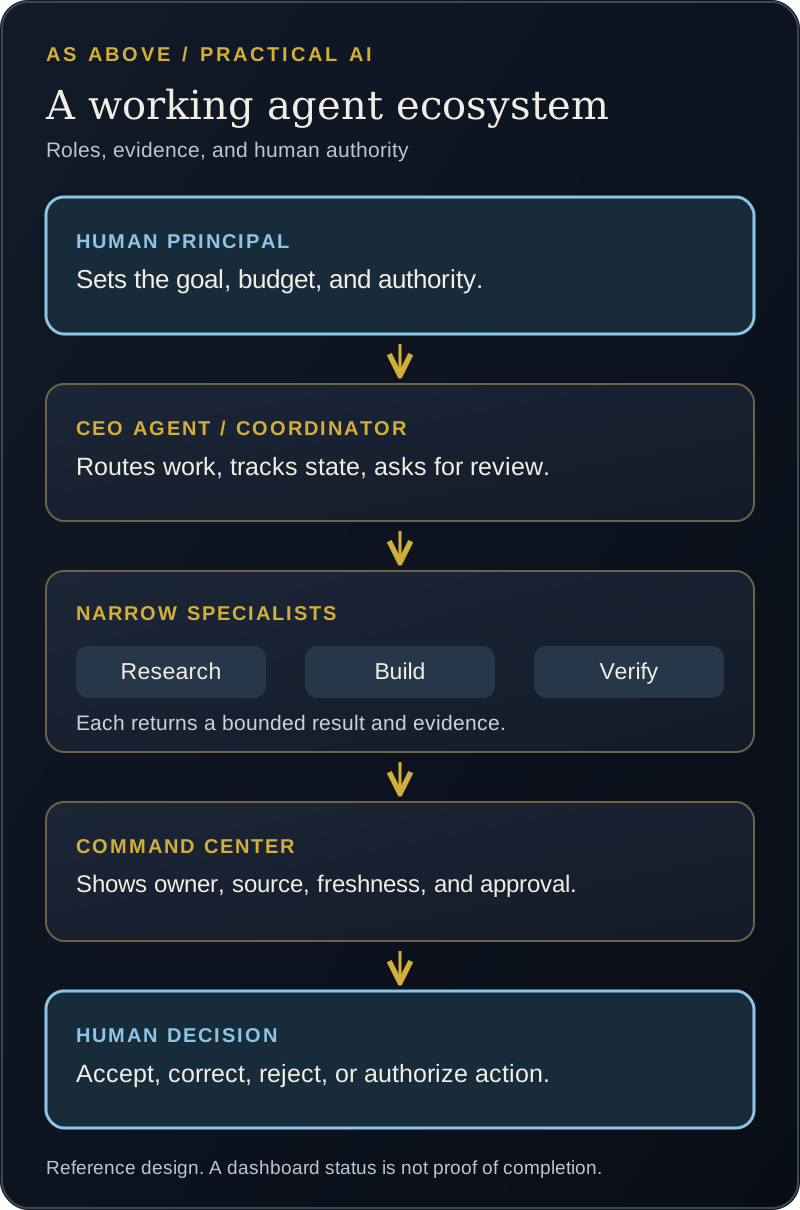
An agent ecosystem is useful when a task crosses domains that need different instructions, sources, tools, or approval rules. A research specialist should be measured on the accuracy and provenance of its findings. A builder should be measured on working changes and tests. A finance specialist should work from reconciled records and stay within financial authority. A verifier should be able to disagree with the agent that produced the work.
You can call the coordinating role a CEO agent, but its practical job is closer to an executive chief of staff. It receives the objective, chooses one accountable specialist, sends a bounded request, tracks the handoff, assembles the evidence, and surfaces the decision. It should not pretend to be a corporate officer or invent authority. A human sets priorities, grants permissions, resolves conflicts, and remains responsible for consequential choices. Manager-style designs keep the coordinator responsible for the final response; handoffs are useful when a specialist should own the next branch. OpenAI on orchestration and handoffs, NIST on human oversight and accountability.
A useful CEO agent does five things consistently:
- Intake: Turn a vague request into an outcome, deadline, risk level, and success test.
- Routing: Give one specialist the accountable job and call others only for bounded contributions.
- Continuity: Keep the task ID, source links, decisions, and current state together across handoffs.
- Escalation: Stop when information is missing, specialists disagree, a deadline slips, or approval is needed.
- Reporting: Show the human the recommendation, strongest contrary evidence, exact proposed action, and proof of work.
OpenAI advises adding specialists only when they bring materially different instructions, tools, policy, or ownership. A team of agents with the same access and overlapping instructions adds complexity without a clear reason. OpenAI on when to split agents, OpenAI on orchestration.
Here is a realistic launch request:
- The coordinator records the objective, deadline, risk, and what approval is required.
- A research specialist gathers sources and marks what is verified, estimated, or missing.
- A creative specialist drafts the page or campaign from the approved facts.
- A technical specialist builds the page and checks that it works.
- A separate reviewer tests the claims, links, accessibility, and release against the original request.
- The coordinator presents one decision packet to the human: what is ready, what remains uncertain, what will change if approved, and where the evidence is.
That is a useful ecosystem even if the agents never converse freely with one another. The handoff record matters more than a lively group chat. For each handoff, include the objective, owner, source, freshness, constraints, output format, authority limit, and evidence required to call the task complete.
What my own setup has taught me
In my operating model, I have defined Axis for intake, routing, and continuity, and Codex for implementation and technical verification. Narrower roles cover research, creative production, measurement, finance, and other domains. This is a role design, not a claim that every specialist can independently complete every real-world task today. A role earns trust only when its tools, outputs, controls, and measured results work in practice.
I am also building Luxe Dash as a command center for my own attention. Its strongest idea is not a collection of attractive cards. It is the possibility of seeing one decision queue across projects: what needs my approval, who owns the next action, which source is current, what is blocked, and what evidence shows a task was completed. Parts of the underlying system use live connections and other parts have used snapshots or manual data. I have learned to treat those as different states. A useful dashboard must say which is which.
The wider principle is transferable even if you never use Luxe Dash: the dashboard is a window into accountable work, not the source of truth itself. The task system, original document, transaction record, or tested release remains authoritative for its own domain. The command center should point back to it and show when a connection is stale or missing. This is a design standard, not an assertion that all of my integrations are complete.
Build a command center that tells the truth
A first version can be a spreadsheet or a simple task board. You do not need custom software. Give each item these fields:
| Field | The question it answers |
|---|---|
| Objective and owner | What is being done, and who is accountable? |
| Status and next action | What happened last, and what must happen next? |
| Source and freshness | Which record supports this item, and when was it checked? |
| Evidence | What file, link, receipt, test, or source excerpt proves the claim? |
| Authority and approval | Can the agent proceed, or is a person deciding? |
| Deadline and risk | When does attention become necessary, and what happens if it is wrong? |
| Result and correction | Was the output accepted, changed, rejected, or reopened? |
Put Needs my decision, In progress, Needs verification, Blocked, and Completed with evidence on the main view. A stale feed should say stale. A preview should say preview. A proposed action should say proposed. Do not let a green badge stand in for a source record. This aligns with NIST's emphasis on documented roles, human oversight, measurement, and ongoing monitoring for AI systems. NIST AI Risk Management Framework.
For any command that changes the world, show the exact proposed action and its scope before approval. After execution, attach the actual result, such as a sent record, updated file, test output, or transaction receipt. A statement from the agent that it "took care of it" is a status report to verify, not the evidence itself. OpenAI's approval guidance distinguishes automatic validation from a human decision before side effects. OpenAI on guardrails and human review.
A practical first month
Week 1: choose and measure. Select one recurring, low-risk task. Record how it works now. Write an acceptance test and collect a few examples you may safely use.
Week 2: make the prompt reliable. Use one model and one prompt. Compare its output with the source and the human's final work. Record failures, including invented facts and omitted actions.
Week 3: connect a bounded tool. Add read access or a draft-only output where it removes real manual work. Define the stop rule and review point. Test missing, stale, and conflicting inputs.
Week 4: make the work visible. Put owner, status, source, freshness, approval, and evidence in a simple command view. Measure accepted results and total human effort. Only then decide whether a second specialist solves a measured problem.
You can follow this path with ordinary software and a human review step. APIs and custom dashboards become worthwhile when repeated use and the cost of manual coordination justify them.
Common mistakes that make an ecosystem look busy without creating value
- Too many agents too early. More names create more routing and review work. Start with one accountable owner.
- A persona in place of a contract. Style can help, but a job needs inputs, tools, authority, output, and tests.
- A dashboard of unsourced claims. Every important status needs a source, freshness label, and completion evidence.
- Unlimited permissions. Broad access increases the cost of error. Give the narrowest tool and approval scope that serves the task.
- No independent check. The agent that wrote an answer should not be the only judge of whether it is right. Our guide to AI agreement bias explains why a confirming response is not corroboration.
- No baseline. Without knowing the old process, you cannot tell whether AI saved effort or moved work into correction.
- Confusing activity with outcome. Messages, tool calls, and colorful status badges are not customer value.
The standard I aim for is modest and demanding: a person can see what the system tried, what sources it used, what it changed, what it could not verify, and whether the result was worth the effort. Build that first. The elaborate ecosystem can wait until the work earns it.
Sources and editorial method
The definitions and technical distinctions draw from Anthropic's engineering guide to effective agents and OpenAI's current guides to prompting, agent definitions, tools, orchestration, human review, and evaluations. The governance and dashboard principles also draw on the NIST AI Risk Management Framework. The seven-step build path, charter, command-center fields, and monthly plan are As Above's practical guidance, not a vendor-certified method. The personal example describes an evolving operating model and does not claim that every connection or agent is live and independently verified. Sources reviewed September 30, 2026.
Keep learning with As Above
Source-linked research and practical guidance on AI agents, robotics, and capital. Get the free weekly letter.
Get The SignalResearch and links checked September 30, 2026. AI assisted research organization and drafting. Sources are linked beside the claims they support. Editorial standards.